Mac cleaner for developers · macOS 13+
Get Rid of Useless Junk. Reclaim dozens of GB.
Xcode, Android, Flutter, node_modules, Docker, caches from half the planet… your disk fills up with dev junk. GRUJ wipes it in one shot — and never touches your data.
3 months free · no card · direct download (outside the App Store)
Prefer the terminal? It ships with a CLI too.
$ brew install --cask fan2dev/tap/gruj 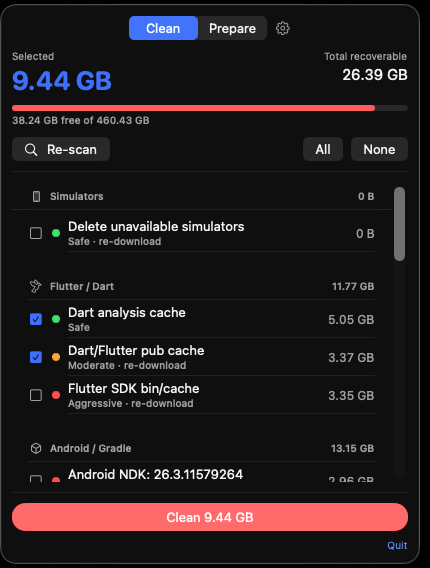
Understands your stack · sweeps what other cleaners can’t even see
A cleaner that speaks your language
Not another generic “cleaner”. GRUJ is built by and for developers.
Deep scan
It knows where every tool hides its caches and builds: DerivedData, Gradle, NDK, .pub-cache, node_modules, Docker, $TMPDIR…
Never touches your data
2-axis safety model: it only deletes what’s regenerable. Your projects, photos and documents never make it into the plan. Scan → choose → confirm.
A real uninstaller
Removes apps you don’t use and the orphaned leftovers they scatter across the system. Permanent deletion — the Trash doesn’t free up space.
Menu-bar app (+ CLI)
A clean menu-bar app for the day-to-day. And, as a bonus, a CLI (`gruj`) to automate and drop it into your scripts.
Multi-language
Spanish and English, following your Mac’s language. Made for developers, whatever they speak.
Fast and safe
Resilient deletion and anti-symlink guards: if Xcode or Docker are open, it skips those targets. Signed and notarized by Apple.
Lives in your menu bar
A clean, direct panel. Open, scan, choose, done. No heavy app to launch.
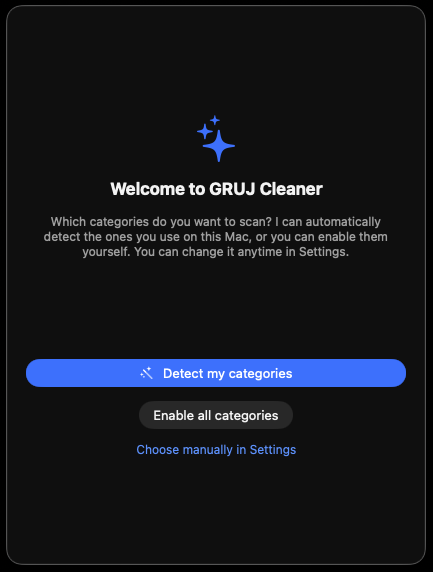
First run, sorted
Pick your categories or let GRUJ auto-detect what you actually use on this Mac.
What you’ll reclaim
Grouped by family, with risk level and the selected total. You tick, you decide.
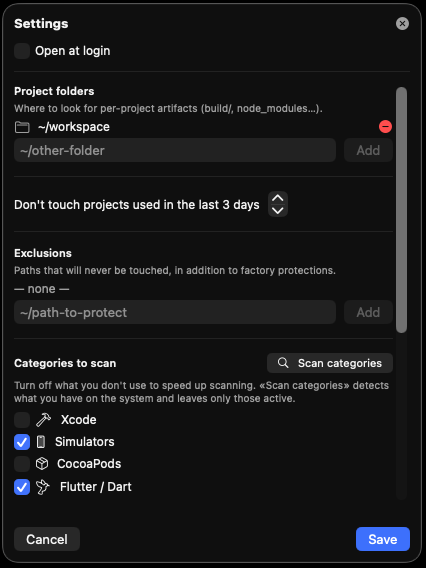
Tune it to your stack
Project folders, exclusions and which categories to scan — entirely your call.
Three steps. Zero scares.
Always the same flow: scan → choose → confirm.
Scan
One click and GRUJ sweeps all your stacks. It shows what’s there, how much it takes and the risk level of each item.
Choose
You’re in charge. Tick or untick by family or by target. Nothing gets deleted without your say-so.
Confirm
You review the summary (“you’ll free 53 GB”) and confirm. Permanent deletion of the regenerable stuff, and off it goes.
Safety guarantee: GRUJ only deletes what can be regenerated (caches, builds, artifacts). Your projects, repos and personal data never make it into the plan.
Extra
Or live in the terminal
Prefer the command line? gruj does everything the app does — perfect for scripts and CI.
↑ And that’s the whole manual. Seriously, that simple.
Install with Homebrew
$ brew install --cask fan2dev/tap/gruj Cheap, no nonsense
3 months free, no card. Then whatever plan you want. Try it thoroughly before spending a cent.
Yearly
Like paying 4 months. The smart one.
- Everything in Monthly
- −67% vs monthly
- Priority support
Lifetime
Pay once. Yours forever.
- All features
- Lifetime updates
- No subscription
Prices in EUR, taxes included · secure payment · cancel anytime
Frequently asked questions
Is it safe? Will it delete my code?
No. GRUJ only deletes what can be regenerated (caches, builds, artifacts). Your projects, repos, photos and documents never make it into the plan. And you always scan, choose and confirm before anything is deleted.
What exactly does it delete?
Xcode caches and builds (DerivedData, Archives), Android (Gradle, NDK), Flutter (.pub-cache), CocoaPods, node_modules, pnpm/bun, orphaned Docker images, simulator runtimes, $TMPDIR and a long etc. It also uninstalls apps you don’t use and their leftovers.
Does it work offline?
Yes. Cleaning is 100% local. It only connects briefly to validate your license, and even then it keeps working offline with a courtesy grace period.
Why isn’t it on the Mac App Store?
Because the App Store sandbox forbids exactly what a good cleaner does: launch tools (docker, xcrun…) and delete across the disk. That’s why GRUJ is a direct download, signed and notarized by Apple — like CleanMyMac or DaisyDisk.
How does the free trial work?
3 full months, no card required. When it ends, you pick a plan if you want to keep going. No surprises, no automatic charges.
Can I cancel or get a refund?
Yes. You cancel the subscription whenever you want and keep using it until the end of the paid period. Refunds are handled by the payment provider as the seller of record.
Your disk won’t clean itself.
Download it, scan, and see how many gigs of junk you’ve got. You’ll be scared.
Download free3 months free · macOS 13+ · Apple Silicon